SAML Single Sign-On
Discover the steps to configure SAML Single Sign-On (SSO) for your organization.
SSO offers a user-friendly approach to log into multiple applications or platforms using a single set of credentials. This document outlines our company's guidlines for SSO integration.
To enable this feature, you must have a teams account and hold the owner role.
Once enabled, All members will be able to log in using your identity provider. Additionally, any new users opting for SAML authentication will seamlessly integrate into your organization, streamlining the onboarding process.
How It Works
- The user can use either of these methods:
A. Member attempt to log in to Wave Connect (Wave) by entering his/her email address.
B. The user attempts to login by clicking on the SSO button and entering the organization username (this can be found and configured under your organization settings on Teams by Wave Connect).
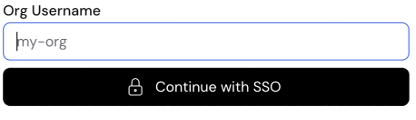
- Wave sends a request to the identity provider.
- The identity provider checks this member's credentials.
- The identity provider sends a response to Wave to verify the member's identity.
- Wave accepts the response and logs the member into their Wave account.
Confirming Domains
Organizations can have more than one domain, including subdomains. Organization admins can request to add or remove domains to their organization at any time. You will need to contact support to make a change to the list of authorized domains.
SAML - What We Need
To integrate with our system, we will need the following:
- The list of authorized domains: e.g. acme.org, acmecorp.org, or dev.acme.org
- The provider's Entity ID: A URL that identifies the identity provider.
- The provider's SSO URL: The URL of the identity provider's sign-in page.
- The service provider Entity ID: A URL that identifies the service provider.
- The provider's public key certificate: The certificate used to validate tokens signed by the identity provider.
SAML - What You Will Need
To link our authentication system to your SSO, you will need to add the following call-back URL into your SAML application configuration:
https://app.wavecnct.com/\_\_/auth/handler (opens in a new tab)
Enforcing SAML
TODO
Use the custom login page
TODO